Showing posts with label made4math. Show all posts

Flipping Over Made4Math


Happy (belated) birthday, #Made4Math!   Because of #Made4Math, how many teachers progressed from simply reading posts to tweeting and/or creating blogs? (me!)  And because of these amazing resources, how many different teachers tried a new idea, changed/improved a lesson, collaborated more with colleagues, read a new book, or took a risk?

One of the popular summer reads is Teacher Like a Pirate, so I decided #Made4Math = a treasure hunt and a chest of gold.

Because of #Made4Math, my blog list exploded! Each time I find a new blog, it's a treasure hunt of additional links, pages, tabs, downloads, and ideas.  Because of #Made4Math, I learned a bit about ColourLovers and creating graphics, Vistaprint, and how to cut composition notebooks.  Bloggers shared everything from posters, to organizing ideas, to 1st day activities.  I work with all of our teachers and I help plan our staff development, so I frequently share your posts with our faculty.  The assessment ideas, such as this post (which inspired me to buy Embedded Formative Assessment and to use similar exit tickets) and the video blog on post-it exit tickets were both favorite blogs for many people at my school.

Because I now have a giant treasure chest of gold ideas, I need a better way to organize all of my blog reads.  Since I've had my iPad, I've used Mr. Reader, which I love, and I'm so happy it now syncs with Feedly.  I'm also using Pocket, but I am still not doing a good job of organizing favorites.  I also tried Pinterest and keeping lists on Google documents, but those options were not working for me either.

Enter Flipboard, which is making me very happy.  I'm not using it for my blog feeds (or Twitter or Facebook); instead, I'm using it as a way to organize my favorite posts and to find new content.  I created quite a few different "magazines," so when I find something I love, I add articles to the appropriate place.

For this week's #Made4Math, I created "Math Goodness," so if you have the Flipboard app, you are welcome to browse my magazine.  If you haven't tried Flipboard yet, it is available on iOS and Android devices.  I learned about it and watched the videos here and on the Flipboard site, and it is very easy to set-up and use.  For my math magazine, I included some of the links mentioned above, but I also tried to add quite a few posts that weren't necessarily math but could be easily adapted to math classrooms.  (Next I need to create a magazine just for assessment ideas!)

For me, one advantage of this format is that I can preview most of the articles.  "Academic" articles do not always include images, so Pinterest isn't the best option for these types of posts.  (And I'm a "words" person, rather than a visual person, so I guess that's why it appeals to me.)


It is easy to share articles via Flipboard, and you can also collaborate on magazines.  If you're still looking for a Google Reader replacement, you can use Flipboard for reading blogs and for your social network feeds.


I have flipped over all of the wonderful new resources I found this year, so thank you #Made4Math and the math blogging community for being such a treasure trove of ideas!  Thank you for encouraging me to share and learn!
Share:

Made4Math - Digital Word Walls

I've really missed blogging and participating in #Made4Math, so after reading so many wonderful ideas over the past few months, I'm happy to be able to contribute to this week's collection.


Several years ago, we jumped on the "Word Wall" bandwagon, and teachers in all content areas learned the importance of vocabulary building, displaying vocabulary, and actively using their word walls.

Had to throw in an English teacher's example, too! 

Fast forward several years, and we're now in the digital age.  One of our junior high teachers, Omar P., who teaches at a technology magnet school and who has created this fantastic informational site, led us into the 21st century with his idea of digital word walls.  (His site includes informational videos, app reviews, and presentations, and his work is helping our entire district!)

At a recent staff development, Omar shared his ideas and how he used his digital word walls, so I created one for my class and wanted to share this great strategy.

Instead of posting words/pictures/diagrams on a bulletin board, the same types of images are stored in folders on your iPad or computer.  Using the slideshow option, you can project the pictures as students are entering the classroom, while they're working on an activity, or during tutoring time.

I created my pictures using screen shots of handwritten notes, of Keynote slides, and of slides using a presentation app called Haiku deck.  I also plan to take pictures of the students' work and add those slides to the folder.  Omar has more iPads in his classroom, so he has had students create word walls using Keynote.  You could also find free images online for additional pictures or backgrounds.
Made using the Haiku deck app


I also included a few slides that were quotes or reminders about strategies for working these problems.


Our test is this week, so for the next few days, I plan to have these slides showing as the students enter the room.  (If you want to see the other slides, my trig identity folder is here.  I just noticed that the Haiku deck app provided a background that misspelled "adjacent," so I'm not too happy about that, but other than that, the slides were pretty and the app was easy to use.)  

I love the fact that these folders of pictures can be saved, changed, and shared.  Teachers and students could collaborate on unit folders, share photos, and update the words/images each year.  As we're reviewing for finals and preparing for other tests, we'll have these folders of pictures easily available and ready to go.  If you would like more information, Omar has a video explanation here about how he has used the digital word wall in his classroom.

Do you have a word wall in your classroom?  How do you use your word wall?  How do you reinforce vocabulary in your classroom?
Share:

Seating Charts are Now a Breeze!

This post probably should be a "My Favorite Friday" post, but since I'm not starting it until Sunday night, I'll add it to "Made4Math!"  (I finally had a chance to catch up on great blogs from so many people!  What a fabulous way to spend a few hours this afternoon.)


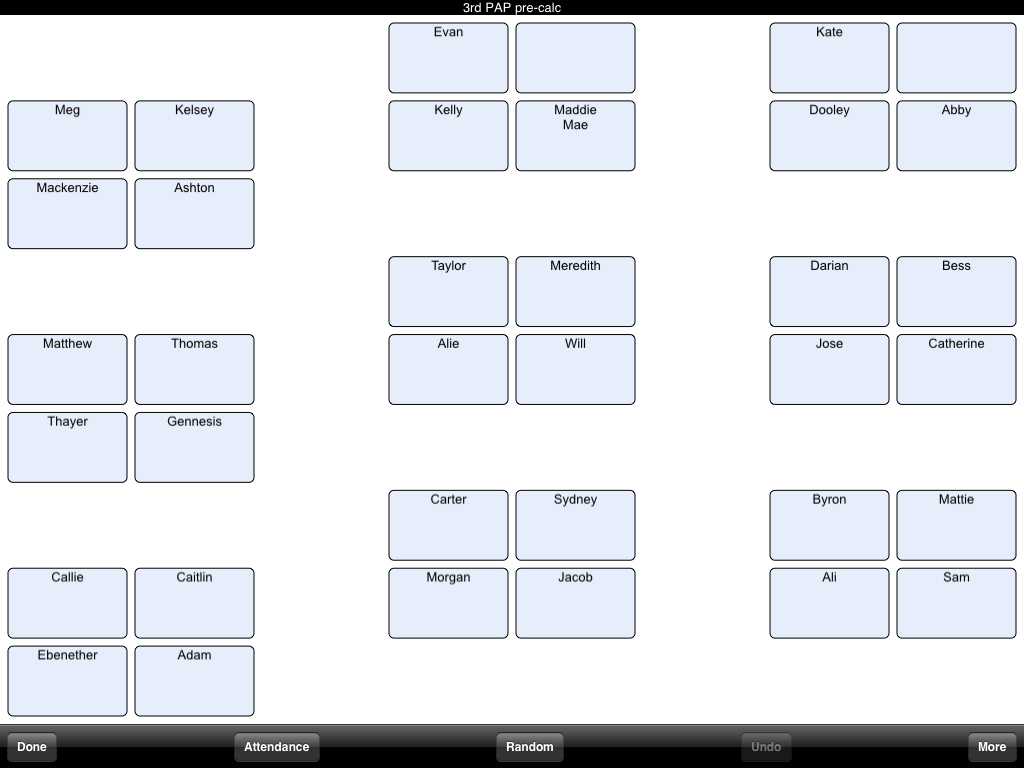
I used the same (ancient) computerized seating chart program for many years, but alas, it no longer worked on Windows 7.  Thanks to one of our math teachers, many of us are now using Smart Seat, and we are all loving this app!  (We agree that it was well worth $3.99.)


Smart Seat is strictly a seating chart/attendance app, but you may also make notes on each student.  

The app allows you to easily change room layouts, and here's a screen shot of my class grouped by "tables."  For the display, I can choose to include first names, first and last names, or first names and pictures.  


Here's a sample class of rows, and I included a couple of pictures for demo purposes only.  (My cat didn't mind posing for a picture!)


You may also add icons to each name to help create an instructional seating chart.  Another cool features is the "Random" button, which provides an in-app random name generator.  The students you have called on are highlighted until you click "Done," so you know who has participated.


I imported all of my students' names using a .txt file, and it was a very simple process.  There are a few other options to change the text size, orientation, and exporting features.  You may save and print each chart as a PDF.


My friend Laura contacted the app developer a couple times, and they were very helpful and immediately responded to her questions, so that's another plus for me. 

To change seats, just hold and drag a student's name to a new location!  There is also an option to scramble all seats to quickly create a new, random seating chart.

I practiced with the Teacherkit app this summer, which also includes a grade book feature, but as of now, I still prefer Smart Seat.  (Teacherkit is free, though!)  

Which teacher productivity apps do you love?  

Have a great week!


Share:

Made4Math - What is Your WHY?

Today's #Made4Math is a bit different, but I think it is a good, reflective "project" for back to school.


Last year, I started a new job as one of our school's two instructional coaches.  Our principal was reading Simon Sinek's book Start With Whyand she thought ideas in the book would be good for our faculty, and she wanted us to implement something.  I immediately downloaded the book, watched Sinek's TED talk, and started thinking about how we could carry out the idea of a WHY for our school and teachers.  (It was very interesting to read a "business" book and relate it to teaching and education, by the way.)


According to Sinek, every person and organization knows What they do and most know How they do it, but few can clearly state Why they do what they do.  He asks you to determine: what’s your purpose, what’s your cause, what’s your belief, and why does your organization exist? 

To encourage our teachers to develop their WHY's, we introduced the concept during our August professional development days.  We allowed each department time to prepare a WHY, and then we shared all of the creations.  Teams took pictures, wrote a philosophy, performed a skit, and the math department may or may not have choreographed a dance.  ("Math Rocks, baby," a la "Ice Ice baby."  If you've got a problem, we’ll all solve it. Check out the math, it’s not magic it’s logic...could have happened...)  My personal WHY is this quote by Benjamin Disraeli: The greatest good you can do for another is not just share your riches, but to reveal to him his own.  All of the WHY's had the same themes and were about helping the kids succeed, moving students closer to graduation, preparing them for the future, and becoming good citizens in the community.

My work partner and I chose the sayings below as our WHY.  We typed up the quotes, got a frame, and put the flyer in a prominent location in our office.  As in any new role, there were several times during the year that we were both floundering; however, any time we questioned our work, our progress, and our leadership, we would refer to our WHY.  Had we helped our teachers?  Did we ease anyone else's burden?  At a particularly stressful time in May, I moved our WHY very close to our desks to remind us that yes, we had succeeded and had a good year.  

How does this relate to #Made4Math?  Because our WHY helped focus us throughout the year, I decided to make our "poster" a bit prettier, thanks to @mathtastrophe's tutoring on ColourLovers.  (She was right, and even a non-artsy person like me could spend a long time on the site playing with patterns and palettes.)  I can't wait to hang our WHY in our office!


For you...
I would like to encourage you to ask yourself, “What is my WHY?”  What is your purpose or your cause for being a teacher?  If you are a veteran teacher, why do you remain a teacher?  Type up your WHY and put it in a frame; share it with your students, make it a screen saver, stick it on a post-it by your computer, or write it on your board.  New educators--you usually write a teaching philosophy during your prep programs, but can you condense your feelings into a sentence or two?  Veteran teachers: when have you formally re-stated your reasons WHY you became a teacher?  (It's time to think about those reasons again!) 

On your challenging days, and you know they'll happen, look over your WHY, meditate for a minute, and remember the excitement and the enthusiasm you felt on the first day of school.

Have a wonderful week!  If this is your first week back, good luck and have fun!
Share:

Made4Math - Partner Quizzes + Extras!

Today's #Made4Math post has once again been inspired by a few tweets and blogs!  Thanks to @druinok for organizing the posts, and I look forward to reading and learning from so many others.


I am what is politely referred to as a veteran teacher, so when I first started teaching (ahem, 1990) everything was teacher directed, i.e. stand-and-deliver, students in rows and quietly taking notes.  When teachers realized that we had to change our ways, our district helped us get our feet wet by using Kagan cooperative structures.  I probably use variations of "Think-Pair-Share" more than any other technique, but my second favorite strategy is the 2-person Rally Coach, or as my students call it, a partner quiz, and I have included one example is below:
Rt Triangle Trig Rally

The Rally Coach was a great way to ease my way into successful group work. Directions may be found here, but I've included a few additional hints and benefits:
  • When writing the quiz, I try to divide the questions' difficulty level as even as possible, so person A doesn't have all of the "easy questions."
  • Use only one piece of paper and one pencil (and calculator) per pair, so the students truly have to share and work together.
  • The first times I give this type of assessment, I also talk about the benefits of teaching others.  I tell students if you can explain something to someone else, or if you can analyze work and find an error, you've got it.  My favorite part of the activity is listening to the students' great math conversations.
  • I also talk about the importance of coaching, being positive and how to politely disagree.  As person A explains her problem, person B listens and coaches.  Once person B agrees with person A's answer, he initials the paper to confirm the work.  (In my class, I ask students to initial and write a positive comment.  Best comment written on this quiz: "That's Shrek-tastic!")
  • I usually make at least one of these questions very interesting, and students really need to use each other to complete the activity.  (The quiz above isn't difficult, but I provide too much information, so the kids have little debates about how to answer the last question.  It's great!)
  • This type of activity always takes longer than expected, so plan your time accordingly.
  • Floating teacher bonus: since I do not have my own classroom, this activity gives us an easy opportunity to practice moving desks and returning them to the original position in another teacher's classroom.
Building relationships bonus:  At the bottom of my quizzes and tests, I usually write a little non-math question, such as "What great books have you recently read?" or "Any good news to share?" and I always respond to their notes.  If I forget to write a question, they ask about it and/or write a note to me!

Making students self sufficient (and classroom management) bonus:  I try to give this type of activity very early in the year to allow students to learn to rely on each other for help.  Several years ago, I heard a teacher say, "Ask 3 before me!" which has become a motto in my classroom.  Students must ask at least three of their classmates before asking me a question.  For today, I made a new flyer, so it's easy to simply point to the sign before students run to me with their questions.  (I'm not the most creative person--you can make it prettier!)
3 before me

After reading a tweet about desk signs and red/yellow/green paint chips (and later the dry-erase bins found by @jreulbach) I recreated a desk tri-fold used by my favorite French teacher.  If a student is stuck on a problem, he may be tempted to sit and hold his hand up (and possibly distract others) until the teacher can respond.  As a gentle reminder, the side opposite of PLEASE HELP says PLEASE KEEP WORKING.  The sign alerts the teacher, but it also reminds the student that he can move on to another problem, keep working, and try something else.  Students can decorate their desk sign and keep it in their notebook to use throughout the year.

Desk Trifold

(By the way, I used "Ray of Sunshine" and "Seven Sixteen" fonts, and I have downloaded more of her fun fonts here.)


And finally, my priority is to make respect central to the cultural of my classroom, and one way I do this is by using common courtesies for everything.  For example, as used above, please and thank you are on all flyers, instructions, and interactions.

I enjoy the partner quizzes because they give students the opportunity to communicate mathematically, but I also love all of the other "lessons" that this activity provides. 

Have a great week!  Good luck with all of the back-to-school happiness!
Share:

Made4Math - Stamp Sheets


Hooray for this week's #Made4Math Monday!  Thanks, as always, to @druinok for organizing our blogs and tweets!

While glancing at Twitter on Sunday morning, I saw the very end of a "How can I use my new stamper?" conversation, and that confirmed what I wanted to post for today.  It takes a village...or in this case, several teachers in my school plus a mathtwitterblogosphere to improve upon an idea, so thanks to many people for shaping my new-and-improved stamp sheet.

Several teachers in our department use weekly stamp sheets (rather than a table of contents in a folder) to help students organize their work.  Students fill in the assignments, teachers check homework/practice daily and give students a stamp, and students turn in the completed paper at the end of the week.  While students work on their warm-up, the teacher walks around the room and looks at their assignment.  The Algebra 2 teacher who used this sheet had two stamps, and different colors represented different point values based on completion of the work.


I decided to try this idea with my ESL students, who really needed help keeping things organized, but I also wanted more space for kids to write and possibly complete warm-ups. Another one of our math teachers created something similar where the front side of her sheet was a table with Monday-Friday warm-ups, and the back side of the page was a table with Monday-Friday exit questions, and she stamped papers after completion of those problems.

Our French teacher shared her great stamp sheet, which I really liked because it also included a place for participation AND a warm-up, so I modeled my last year's sheet after the one below:
Stamp Sheet (Fr)

My stamp sheet from last year would have been just fine...until I saw what other people had created, and I knew I could do something better.  I loved the Bell Work form @mathequalslove created because it gave more space for each day's warm-up.  (And I loved the fonts!)  @mathtastrophe's Smash stamper was a must, plus the forms and templates she and @druinok created looked so great with all of those cute fonts and formatting.


So for my new and improved form, I created this document:
Stamp Sheet


Bonus idea: for the last summary question on the document, the kids respond to the questions:  what are you square with, what are 3 points you want to remember from the week, and what is still circling in your mind?


I downloaded at least 15 new fonts and used "Throw My Hands Up in the Air" for this document.  I found the Smash stamper at Target, plus I found a couple other self-inking stampers and sticky-tabs for fun.  


I created a practice sheet, stamps and all, and my samples are below:


After completing my first stamp sheet, I noticed a couple things.  My font may be too "scripty" for my ESL students, so I may need to go back to something more straight.  In case you're wondering about my vocabulary choices, I teach a newcomer ESL class, comprised mostly of refugees.  (I recently saw another math blog where the author is in the same situation, and now I can't find it!  Any ideas?)  We have a huge population of Burmese refugees, and last year we also started enrolling quite a few students from Nepal and Somalia. Some of the students cannot respond to "What is your name?" and none of them have ever held a TI-84.  The first six weeks is always very interesting, and I can now say hello in at least 12 languages. :)  But English does not look like Karen, Chin, Nepali, or Arabic, so straight fonts and big, printed letters are best!


I also read a sentence on @pamjwilson's post that got me thinking:
Sure you could put a check mark, stamp it, etc. but the sound / click of the hole – punch (or stapler) does something crazy and the students - especially for those who are struggling are motivated to keep on working.  Weird, huh?
She is so right!  Last year, I used the stamper below, and it had a very satisfying sound.  As soon as a student finished the classwork and practice, I stamped his/her paper.  Once I started stamping papers, the kids kept working so hard so they could get their practice stamp before the end of the period.  (I also stamped the participation column at the end of the period.)  If they didn't finish their work, I simply stamped their paper at the beginning of the next period.
Students turn in their completed sheets on Friday, and I check their warm-up and reflections for the week and count stamps for a participation grade.  I can definitely use the Smash stamp, stickers, and flags on their papers that I check outside of class, but during class, I may stick with my old red/blue stampers from Office Depot...just so we can hear those happy sounds!

(ESL side note: when I started using this stamper, it led to a quick conversation about the differences between a noun stamp on an envelope or a rubber stamp, the verb stamp your paper with a stamp, and how to stomp your feet.)

For my students, we mostly fill in the stamp sheet one day at a time.  (We also write in quizzes and tests on appropriate days at the beginning of each week.)  On Monday, their "assignment" will be to turn in their information paper, and they will receive a stamp when I receive their paper.  Their participation stamp will be a freebie, but I hope they will at least verbalize their name.  On Tuesday, their assignment stamp will be checking that their foldable is finished and taped into their notebook.  Their participation stamp will probably be to complete a sentence starter, such as my name is ______, or this is _______ class, or your name is Ms. _______.   Last year, I also used the stamp sheet to get the kids to predict our lesson for the day, i.e. "Monday and Tuesday, we practiced solving equations by add and subtracting.  What do you think we will do today?"   Furthermore, at the beginning of the week, if we filled in a TEST on Friday, I asked them what we would do in class on Thursday.  (Review, of course!)

I am excited about my new stamp sheet, and I am happy to have this routine ready for the beginning of the year.  When I started using this strategy last February, it took a few extra minutes of class, but I thought it was a valuable use of time, helped the kids stay organized with their work, and made me more consistent about including writing and speaking in my ESL class.

What do you stamp in your classroom?  Do you give your students a participation grade?
Thanks for reading!
Share:

Made4Math - Graffiti Boards

I have had so much fun finding new blogs, looking at classroom and project pictures, and reflecting on all of the contributions for #made4math!  I am so fortunate that I stumbled into this amazing community of math teachers and bloggers.


Today's idea is an easy strategy that can be implemented on day #1: using a "Graffiti Board" in your classroom.  (I am a floater teacher and share board space in my classrooms, so my personal examples are not Pinterest-worthy; however, I have included one example of a semi-permanent board, and I'm certain there is a lot of creative potential.)  

This strategy came from a differentiation institute, and the session presenter suggested graffiti boards for two purposes: assessment and building class culture.  I have tried this tool for a few months, and I have used boards for both purposes, and it is a strategy that I will implement next year.  (And my HS students seemed to respond well, or at least they enjoyed writing on the board!)

Making your own graffiti board is as easy as 1, 2, 3.
  1. Write any question (or word, thought, quote, etc.) on your board before class begins.
  2. Get students to respond (as they enter or leave the room, or at another designated time).
  3. Comment or somehow use the results.
Graffiti Boards as a Quick Assessment
My first graffiti board was a pre-assessment, and I asked my students what they remembered about logarithms.  I wrote the question on the board before class, and hoped students would respond.  Obviously, only a few did, so I needed to work on step #2.   (Resolved: I left more markers out, and as students entered, I simply asked them to answer the question on the board.  After a few mornings of "graffiti time," most kids entered the class hoping to be able to write on the board.)


The second board is an example from the middle of a unit.  Several of my boards asked, "How are you feeling about ______?" which also led to conversations about problem solving, confidence, study skills, and growth mindset.  (From the board results, I allowed AM to move on to the next lesson, I talked to the "1's" individually about tutoring, and I changed the pacing of the lesson a bit.)  


After using a number-line graffiti board every week or so, we even created another type of language in our class. "Work with your partner until you both feel closer to a 4," or "Ms. L, I'm feeling about a 2 on solving log equations, so when are you available for tutoring?"


One of our chemistry teachers created a much prettier example of a graffiti board to use with a week-long project.  Each of her students made a "marker" using a popsicle stick with a magnet glued to the back and his name written on the front of the stick.  As the project evolved and as students uncovered research, they moved their names along the scale to answer the posted question.  ("In order to combat dependence on fossil fuels, the US should build more nuclear fission reactors."  Do you agree, disagree, or are neutral?)  I loved that she was able to create a single, permanent board for 4 of her class periods, and it was great to see her board change after each day of research.


Graffiti Boards to Encourage Participation
The other use of graffiti boards is to encourage participation, create a positive classroom culture, and build rapport.  At the differentiation institute, I learned if students write or speak at the very beginning of class, they are more likely to participate throughout the class. 

I started my class blog in February, and I offered the first post as a tiny extra credit--just to see how the commenting worked, who would participate, how did we like the idea of blogging, etc.  I used a graffiti board to remind the kids about this bonus opportunity and to see if they were willing to comment on our class blog.  (Results: yes, I would write another blog entry, and I would expect many student comments for the first post.)


On occasion, I asked a non-math question on the graffiti board, just to get everyone to write something as they entered the room.  The questions were usually silly so I don't have pictures, but I would write the question and students wrote their answers all over the board.  Example questions are as follows:
  • Who's your favorite character on Glee?  
  • Before the release of Hunger Games: would you rather live in District 12 or live in the Capitol? 
  • What are you looking forward to this summer?
  • To ask the first week of school: what is the best part about starting a new school year?
I would always share my answer, we would discuss the question for 1-2 minutes, and students found similarities in the responses, which helped build class relationships.  The kids loved the "Would you rather...?" questions and wanted that type of board more than any other. :)

Other Ideas
Graffiti Boards in a Flipped Class
An idea for a teacher who flips his class is to write a problem on the board that relates to the previous night's video, and ask students to rank their understanding of the problem AND sit at a table corresponding to that number.  For example, students who are completely lost (or who didn't watch the assigned video) would be "1's" and sit at table #1.  As the teacher works the groups, he knows whether to provide a lesson intervention or an enrichment, simply based on their table number.

Graffiti Boards in Staff Development
In a small group meeting, we used the board below to assess our knowledge about mindset.  "Growth Mindset" was written in the middle of the board, and we all went to the board and wrote our definition or ideas about the main topic.


Student Responses and Technology Thoughts
Last year, we allowed students to use their cell phones for instructional purposes, so I tried Poll Everywhere and GoSoapBox (when it was free).  Our district is now moving to BYOD, so this summer, I have been playing with Socrative and Wiffiti (especially now that I am working on tweeting) and we have several sets of "clickers" floating around the school.  I definitely love the idea of using technology to help assess my students, but for the quickest, easiest, last-minute set-up, nothing beats a graffiti board--writing a question on the board and asking students to respond.

Would a graffiti board work your classroom?  I would love any suggestions or examples of how you have used the boards in your room!
Share: