I used to think _____________, but now I think ________.

I can't believe it's been a whole year since the world changed. 

Many of my favorite podcasts and PLN friends recently shared reflections, questions, and prompts to reminisce on this past year, and since I'm doing a #safeathomespringbreak, I thought it would be worthwhile to spend time reflecting, too. In addition, I received my first vaccine dose on Saturday (3/13/21) so I'm feeling especially grateful and reflective today.

I must acknowledge how fortunate I am with my health and my family's health and well-being. I know it's a privilege that I have been able to work safely at home, that I can have groceries delivered, and that I have the technology to stay connected to friends and family. 


My Pre-Pandemic Timeline:

One of my resolutions for 2020 was to journal at least three times a week, so I have quite an accurate record of my feelings leading up to the pandemic declaration. I want to put all of this information in one place so I'll have a record of what happened.
  • February 29, 2020: Attended an #edcamp, and one of my friends told the story of her son trying to get out of Rome and his study-abroad program. Italy was shutting down because of COVID-19.
  • March 6: Helped run our whole Staff Learning Day, and we started our spring break at the end of the day. I remember my shock when South by Southwest canceled that evening. 
  • March 7: Flew to Portland, Oregon with my work friend, Arynn. We talked a little about "the virus," and we packed extra hand sanitizer and Clorox wipes for the flight. We saw a few masks at the airport.
  • March 8: Met #botjoy artist Gary Hirsch! We all hugged hello. (When we saw him before we left on 3/10, we elbow-bumped goodbye.)
  • March 9 - 11: Enjoyed an amazing time on our mural tour and loved being in PDX. We continued to use a lot of hand sanitizer, but it was not a fearful time.
  • March 11: Flight home, and we definitely saw more masks at the airport. Started hearing about closings: schools, districts, events. The NBA suspended its season.
  • March 12: Some of our first districts started closing and extending their spring breaks. Kristin called and asked me to start a website (or something) to begin curating resources for educators. Twitter exploded with resources.
  • March 13: the US declared a national state of emergency, which was fitting for a Friday the 13th. I remember my "COVID-dreams," started that weekend. I kept waking up thinking I was feverish or with a sore throat, believing I caught something on the trip to Portland.
  • March 16: Returned to work, and what a fearful place it was. Districts were closing all over, and we didn't know what to do, so we kept working on a website of resources. Many of us were in a large open space, sharing details about how to get the work on the remote learning website when the government declared to avoid gatherings of more than 10 people.
  • March 17: Worked from home and started curating resources. Our director told us mid-afternoon that we HAD to start presenting Zoom webinars tomorrow. We had no presentations, no materials, and little knowledge of Zoom. The team of six of us figured out what to present, and then we went to work. I was so thankful that I helped facilitate #EdChangeGlobal in 2018, and I knew something about Zoom, but I had never facilitated a webinar on my own. We weren't able to advertise until about 4:00 PM that day, and we shared via social media. 
  • March 18: 10 AM, I kicked off our entire "Emergency Remote Learning" webinar series with a brand new session, Mindsets of Remote Learning. And it's been the webinar/Zoom life for me ever since that day. 
Thinking back to those days still makes me agitated and makes my heart race! I seriously can't believe it's been a year. Somewhere within that week, we first canceled our #CoffeeEDU and then re-vamped it to be an online meetup, so this Saturday's event will be a one-year celebration of resilience and gratitude.


I used to think...

One of my favorite Visible Thinking routines is to respond to the prompt "I used to think ... but now I think ..." (My students even tried something similar, and I documented one example on my old class blog in 2012!) That sentence starter has been useful as I've worked on my personal reflections for the year.

For our team book study this semester, our Director chose A Beautiful Constraint, which is apropos for the year, right? 😳 My first "reflection" activity today was to create a "year in numbers" graphic to highlight the work I've accomplished despite the year of constraints. This year, I've "reached" more educators and created more content than in my combined past 5 years at R10! 

I used to think there were only a few ways to deliver PD, but now I think the sky is the limit! 

Our teams at the ESC have been so creative with their professional learning sessions, innovative solutions to reach educators, inventive formats, structures, and delivery methods, and I'm so impressed with what my colleagues designed and facilitated this year! Our team's first two weeks of the emergency remote webinars was an incredible achievement, and I'm still so proud of our work. We reached thousands of educators in a few days' time, and I think (hope!) we helped alleviate some of the enormous stress.

With synchronous and asynchronous learning, nano-courses to lengthy online courses, facilitated learning to independent explorations, I hope we continue to design and deliver a multitude of session types and formats. As I mentioned in my last post, I also learned so much about my own preferences and the types of learning experiences that I want to participate in, and it's wonderful to have so many choices available.

Understanding the many ways to "do" PD has been a highlight and a huge area of growth for me this year. In addition, I'm on a committee at work to help design a professional learning model for our service center, so PD has been at the forefront of my mind all year. My next goal, however, is to find ways to really help that learning transfer and stick.

This week, I plan to continue to reflect on the past year. It certainly has been a time of learning for me, and I want to continue developing my ideas about PD and growing into a better designer and facilitator. 

Always learning about professional learning.

PS: My 2020 spring break trip to Portland was one of the best trips. I couldn't think of a better way to spend my last pre-pandemic days. Here are a few photos of the #botjoy mural tour.


Share:

Don't make my mistakes about learner preferences!

My very first day of working safely at home was March 17, 2020. I think it's very symmetrical 🤓 that my very first (limited-staff) day "back" in the office is August 17, 2020. During the past 5 months, I know most educators have been working non-stop, so I'm grateful to take time this morning to reflect on a few things I've learned during our time of emergency remote teaching and learning.

What I've learned about my own learning preferences...

  • A typical webinar is not my preferred way to learn. If I'm not engaged in activities, connecting with others, or at least utilizing the chat, then just send the recording for me to watch at my own convenience (and possibly speed up the presentation and pause as needed.)
  • I have participated in large-ish online, asynchronous courses where the instructor designed the class so we became a collaborative community of learners. My summer MOOC experience with thousands of participants is not collaborative, so in the future, I must create that community myself.
  • It takes a lot of effort and intentionality to design an effective online course. (h/t to my favorite instructional designer, Julianna!) Watch a 3- to 5- minute video, post a reflection on a discussion board and repeat 50 times does not work for me.
  • I'm obsessed with ideas in the book The Art of Gathering, so if we gather, I want a purpose, an agenda, and a plan.

And what that means about others' preferences...

At one point during the summer, I was hesitant to offer a series of tool-based webinars. Show-and-tell presentations are my least favorite ways to learn; however, as my colleagues reminded me, others benefit from this type of live stand-and-deliver type of presentation. Some educators appreciate the anonymity of courses with thousands of participants, and/or they find ways to connect with smaller cohorts within the larger group. I realize many colleagues prefer the casual, organic conversations that arise when you hold a meeting for open discussions.

I allowed my own preferences to dictate how I designed professional development sessions and meetings. I limited myself because of my limited preferences. And I can't believe I fell for that mistake!

I've written about learning profiles, I've presented about differentiation and learning profiles, and I've shared extensively about learner preferences, as explained in The New Pillars of Modern Teaching. (Here's one post about that subject, and it explains preferences in terms of time, place, medium, and socialness.) 

Bottom line: I need to remember to design for other people's preferences, not just my own. Just because I prefer reading the text, doesn't mean everyone enjoys that same style. I want collaboration and connections, but others may prefer independent work. Not everyone is comfortable being a fearless clicker, so how can I include a bit more scaffolding within my PD sessions? 


One small solution.

Last week, these tweets inspired me, and I had the pleasure of working with a former colleague on her first lesson plans, so I'm putting all of these fabulous ideas together, and I'm relating everything to learner preferences: 

My friend wanted to give her students options for content input. She had a video ready to share, but the session had to be synchronous. I shared the first tweet about all of the different possibilities for breakout rooms by learner preference, and she loved that idea! This lesson will be her first "official" lesson, after several other introductory and community building meetings, but she considered limiting the breakout rooms to two choices, rather than three or more. (The second tweet about the importance of routines and practice applies to juniors and seniors, too!) 

1 Teacher Led: Teacher walks through process with students; 2 Independent - Students watch video, etc. on their own (headphones);3 Collaborative - Students work together, explore the resources together

She's fortunate because she is allowed to use Zoom and breakout rooms, and all of her students have the same device, so they can practice together changing their names to include a 1, 2, or 3, all based on their room preference. She will stay in the main Zoom room, and others who want to stay with her do not move to a breakout room. I know there are a lot of ifs in place for this activity, but I think it's a great start and a way to recognize how we can manage our preferences in remote settings. 

The same idea can kind of apply to face-to-face and hybrid models, too. When we're back to a face-to-face environment (that allows a bit of movement in the classroom) if the content is curated and designed for students to access it independently, they could have the same options within one class: small groups and workshops that are teacher-led; students learning and exploring resources independently; students discovering ideas by collaborating, or at least chatting while they worked. 

Side note: In our region, I'm suggesting that educators prepare for remote experiences because I foresee the remote learning dates to be extended, plus it allows planning for student absences, teacher absences, tech troubles, etc. So if the plan is for remote and asynchronous learning, I feel it will be easier to transition to other formats. 

I think this strategy will definitely work for PD sessions, and I can't wait to see what adult learners think about this addition of some choice in how they access the content.

A little more about learning preferences.

Last spring, a teammate and I created a podcast series called From Triage to Transformation, and we considered what learning might look like in the fall. Here's one episode where the focus is learning design for students, which is really all about learner preferences.


We recorded these episodes in April - May 2020, and I wonder how many of these transformational ideas can work in our current realities? 

During our summer of 2020, what did you discover about your own learning preferences? How can this information apply to your own classrooms, teams, or PD sessions? 

Always learning, even remotely. 
Wishing educators all the best for this new school year.
Share:

Looking Back and Planning Ahead

It's January of a new decade, which means many people are sharing #oneword, a yearly theme, top 5 posts/tweets/photos, or resolutions. During the past few years, I jumped on that bandwagon too, but this year, I may be a bit extreme with my themes and goals. 😳Since it's a milestone teaching year for me (30 years as an educator!) perhaps it's appropriate that I'm going a bit overboard for 2020. But hmmm, it's a bit perplexing that my word/theme for the year is clarity. Does that mean I still don't know what I'm doing??

My zig-zag post from January, 2019, alluded to the same feelings of uncertainty though, and since I didn't make much progress there, I hope my focus on clarity will shed a light on what's missing or unclear.

I consider myself pretty introspective, and I believe my inward-looking habit really started during grad school, around 2004. My very first reflection post was as a guest on a blog for new teachers. I shared my 20-year reflections, and re-reading it now, I'm still satisfied with what I learned. (I wonder why the quotation marks and apostrophes are now weird symbols?) Looking back at my reflections from last January, which include ideas from multiple years, it seems like my quotes, ideas, belief statements, and reflections all align...so perhaps I'm a bit more certain than I feel. But I want to know where I can focus my attention and how I can improve my life, home, and work.

By the way, my 2019 #oneword of heart worked really well, but I was about 70% on my 19 for 19 goals. Home improvements, travel, volunteering, and becoming ISTE certified were the wins. On the other hand, I did not complete 12 blog posts last year, I didn't get anywhere close to a month of all activity rings closed, and the bedroom closet is still a mess.

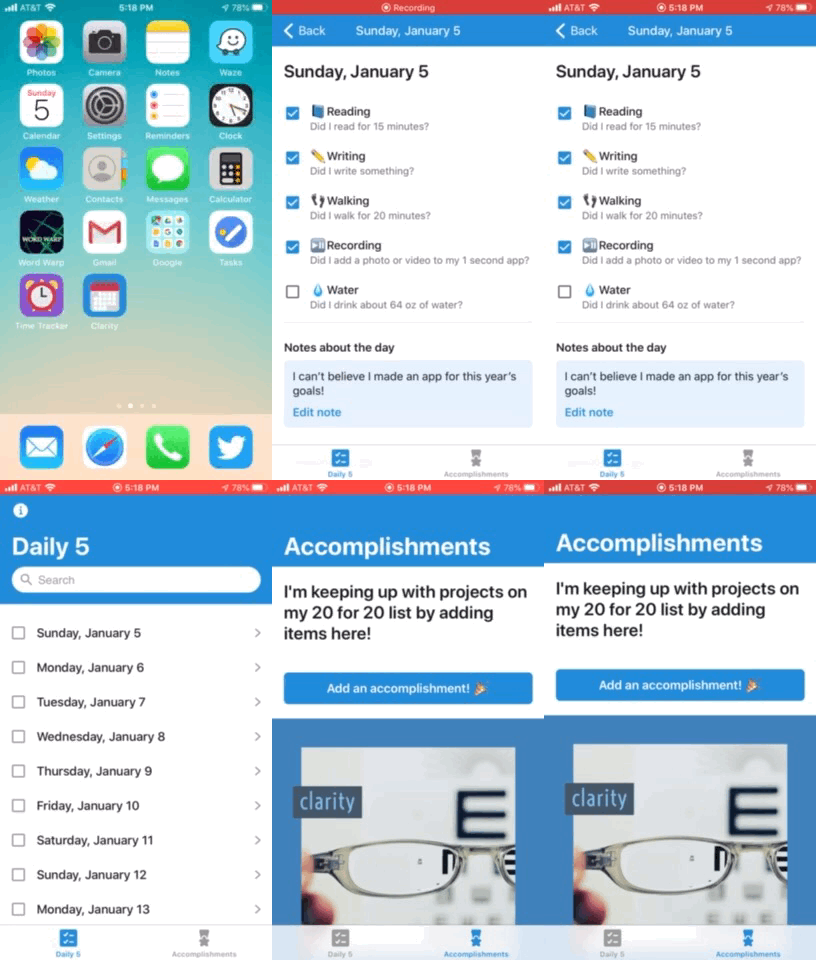
So this year, I've created my own happiness project with monthly themes that all focus on clarity. Self-knowledge is my goal for January, and I have plans to gain clarity on my personal value statements and actions. My future monthly themes include clarity with relationships, work, health, and home. In addition, each day I plan to read, write, walk, drink a lot of water, and record a video or take a picture for the 1-second a day app. These small goals are part of my 20 for 20 goals. To help with these daily habits, I'm going to re-read Gretchen Rubin's Better than Before book, AND I made a Glide app to help me track my habits. (#nerdalert and as I said, a bit extra this year. And did I mention I found a clarity color palette, too?)


And to wrap-up, my 2019 highlights were:

  • work: creating our Digital Learning Radio Step-In podcast series, plus all of my self-work surrounding equity, diversity, and inclusion (which continues!)
  • self: big furniture purchases, traveling to Philadelphia, visiting the Grand Canyon, attending the Krewe of Boo parade in NOLA
  • service: teaching an adult ESL class each week

Looking forward to more clarity in 2020!
Always learning.
Share:

Are you an expert curator and don't know it?

What is curation?

It's funny how often others have told me, "You should be a librarian!" Yes, I love reading, and I can recall a lot of information. My parents seem to be in awe of my research skills, but that just means I can do good internet searches! According to my StrengthsFinder results, two of my top themes are Arranger and Input, and both of those ideas lend themselves to my librarian-like-tendencies.

But I actually think all of these concepts center around the notion of curation, something I couldn't truly articulate until my deep obsession study of The New Pillars of Modern Teaching.

When I first started sharing the concept of curation in professional development sessions, participants intuitively understood the process because of the comparisons to museum curators: curators select works of art or artifacts, decide how to organize them into a museum space or room, and then add descriptive cards to share information about each piece.

In The New Pillars, Dr. Allen shares the three Ss of great curation, and then she suggests that educators help their students master the art of curation. I later found this post from Dr. Allen that called curation your learning workflow, and all of the pieces fell into place.

I created this graphic for an assignment in #ClassyGraphics!
During the past few years, I worked to improve my own workflow for each of three Ss, but I know there is always room for improvement! Fortunately, as technology develops, I continue to find more tools that assist with my learning workflows.

Curation Renovation

In one of my favorite professional development sessions, I ask participants to reflect on their own learning workflows and preferences, and then we try a curation renovation. We use the 3 Ss of curation to find any "gaps" and spend time exploring tech tools to help make personal curation more efficient. I still occasionally email links to myself, but that process definitely slowed! If you ask me for a blog post or article that I recently mentioned or shared, I can quickly find it. The goal from The New Pillars is that if you understand the process of curation, you can help others, either students or colleagues, understand and improve their learning workflows.

Last year, my teammate Ashley and I recorded this podcast episode about curation. We revisited all three Pillars, so we refer to the book and our other episodes. The episode show notes include all of the blog posts mentioned, and there are many ways educators can include curation in their classrooms. The word curate is now included in the ISTE Standards for Educators, too.


We also discussed these curation tools: Toby for Tabs, OneTab, Google Keep, Diigo (educators get an upgrade!) and Wakelet.

So are you actually an expert curator? Have you considered your own learning workflow? Is the process working for you, or can you make some tweaks about how you scan, study, and share?

Always learning (and it's so fun to be learning about learning!)


P.S. For fun, Faith Salie shares her opinion about curation in this video. She claims curate is overused, but I think we're just beginning to understand the power of curation!


Share:

Are you using these tools to add audio in your class?

Neon sign that reads "You are what you listen to"
Photo by Mohammad Metri on Unsplash

Podcasts for Learning

Last year, I wrote about my Podcast Love and my podcast routines, but this summer, I presented Podcasts for Learning multiple times, so I wanted to share a few additional ideas about using audio and podcasts in the classroom.

Finding Audio

During my sessions, I share two tools to help find podcasts: Listen Notes and ListenWise.

Listen Notes is a search engine for podcasts, plus it allows you to clip podcasts and create podcast playlists. Here's a clip describing what Listen Notes can do (from our @DigLearnRadio podcast!) and here's a playlist of our episodes about coaching. I also just learned that your can add this playlist and all episodes into your podcast player. Use this feature to create a podcast choice board, perhaps?

ListenWise is a tool from NPR that has "curriculum-aligned podcasts with accompanying teacher resources." The audio clips can be filtered for content area and grade level (5 - 12). For the free version, you get the audio clip, listening comprehension questions, and a Socrative import quiz code.

Recording Audio

In my session, I joke that podcasts fall on a continuum from "Kathryn talks to pre-schoolers" --> This American Life. Students (or you) can record quick, unedited audio clips OR you can create full-blown podcasts that can be shared with others.

Creating audio can be as simple as using a recording app on your phone. Getting the recording to the teacher is sometimes a challenge, but educators in my sessions suggested email, Google Classroom, and a shared Google folder. 

I discovered the Online Voice Recorder on this post from Free Tech 4 Teachers, and it's a super simple way to record (and do a bit of editing.) Once you record, you save the file, and you still need to get that "published" in some way. When the Insert --> Audio feature in Google Slides is fully functional (rollout paused on 7/24/19) that may provide an easy way to collaborate and share, but until then... Here's my sample slide with a recording from the Online Voice Recorder inserted into Google Slides. (I have the Insert --> Audio feature in only one of my personal Gmail accounts, but not my Google for Education accounts.)


Synth is a relatively new tool for recording audio, and I've tried it in a few of my sessions with some success. It's still in beta form, and I think it's a bit challenging to get it going, but the teachers in my sessions this week saw a lot of potential. There are a lot of features educators loved about it, such as the time constraints, transcriptions, and the option to include text comments. It also embeds beautifully into a website, its target audience is educators, and you can create "closed" classrooms. The audio below is from our session...all in unedited format, so you get bonus content of all kinds of background noise. 😉


Within this session, I also share Anchor for creating podcasts. I keep trying to get more people to share a recording in Anchor, but its entry point is not quite as simple. For educators who want to create their own podcast, and for teachers whose students are >13 years old, it does seem like the easiest platform to use for creating and publishing to the world.

Using Anchor, I collected all of the audio from this week's sessions and created a new "podcast" of all shared ideas.


Sharing Audio

On the #mfltwitteratipodcast, the hosts shared a hack of how to embed podcast players into a Wakelet collection. Using links from Spotify, you tweak the code to create a collection where the specific episode plays within the Wakelet.

For my recent Podcasts for Learning session, I decided to keep track of what I listened to and learned during a single week, and I added all of my notes to this collection. Here's my Wakelet without the hack (podcasts open in a new tab) and with the hack (players are embedded, also shown at the bottom of the post). The first ISTE Standard for Educators is Learner, and I definitely use podcasts to learn from and improve my practice!

If you want to create a podcast choice board for your students, this trick might be a great way to share the collection. You could also us this hack to create your "Podcast Tasting" PD session, as described by my PLN friend Meredith Akers.

Even More

Within the session, we briefly discussed creating more structured, polished podcasts, and I shared resources from the EduBlogger, ListenWise, and NPR about creating podcasts in classrooms.

Any other tools for recording audio? Any other favorite podcasts? I share my finds using #R10PodPD and would love to have more suggestions!

Listening and learning...


Check out my Wakelet with embedded podcast episodes!


Share:

Sketchnoting as a #GrowthMindset Journey

A couple of colleagues and I are facilitating a full-day sketchnoting workshop, and as an introduction, we plan to share our sketchnoting journey, so I wanted to take time to reflect and pick out key steps on my path. By the way, I have no art background, and I feel like I'm quite under-qualified to "lead" this session, but I'm working with fantastic colleagues, and we've had a great time planning the workshop.

I discovered sketchnotes in the winter of 2014, and I've been trying them off and on since then. I would like to be more consistent with my practice, so this post will also serve as my attempt to become more accountable. 😉

After I learned about Carol Dweck's work, I always shared the concept of mindset with my students. (Check out all of my posts about mindset.) That particular year, however, my students really struggled with the ideas of failure and risk-taking. I thought if I took up the practice of sketchnoting and shared my work with my students, I could show them my attempts and we could document my improvement over time. I still say, "I'm not an artist," and I continue to have a pretty fixed mindset about it, but I'm determined to practice what I preach!

I found a few sketchnoting resources and started practicing. I believe that's when Sylvia Duckworth started freely sharing her sketches too, so she has inspired me for many years!

At the same time, one of my teammates was finishing her dissertation (basically about notetaking and retention techniques) and she asked if we could try some visual thinking maps with our students. YES, please! One of our units was extra-heavy with vocabulary, so that's where we started. We asked the students to create graphic organizers/sketchnotes to show the relationships between the terms and concepts in the unit. Here's the only sample I saved (and it wasn't even my student) but I loved this student's design and use of colors.

At the end of that school year, I transitioned to my current job, and my interest in sketchnoting grew. Sketchnoting was the subject of my "Genius Hour" project in 2015, and I shared one of my very first sketchnotes with session participants that fall.
Since 2014, I watched countless videos and webinars about sketchnote techniques and tools. I read books, blogposts, and followed Twitter hashtags. I attended sketchnoting sessions at TCEA, ISTE, and at edcamps.

My sketchnote turning point was participating in the 2017 #sketch50 Twitter challenge. I completed all 50 prompts (on time!), learned new techniques, and grew my PLN. The daily prompts were perfect brain breaks, and every day, I looked forward to creating during lunch or as a relaxation activity after work. Here's my entire album of sketches, and it's so fun for me to see the growth and improvement in my sketches.

Another key from 2017 was participating in #ClassyGraphics. That course taught me about colors, fonts, and design, which really helped with my sketchnotes, too.

For the 2018 #sketch50 challenge, the focus was creating quick sketches and #ProcessOverPretty. I'm working to complete more quick sketches, but I still like to take a bit more time with my sketchnotes.

In 2018, I took #ClassyVideos and the subject of one of my earliest videos was a quick overview of my sketchnote journey.


Over the years, I have sketchnoted blog posts, TED talks, podcasts, personal learning, and books. I also try to sketch workshops, but I'm much better at creating sketches as reflections and to synthesize my work, rather than real-time sketching. I've included a few of my sketchnotes in past blog posts, and another goal is to start sketchnoting our podcast episodes. (We'll see.)

For 2019, I have 19 goals ("19 for '19") and one goal is to master 50 sketchnote icons. The experts say you should have 100 icons in your visual vocabulary, and I'm about a quarter of the way there. 😳

A sketchnoting highlight of 2019 was to host Sylvia Duckworth at Region 10 for a full-day workshop, so I learned from the best!

I continue to have a #growthmindset about my sketchnoting, and I'm always learning!

If you want to see the images that are too tiny to see in my Sketchnote Journey graphic, here's the entire album.
Share:

Inspired at ISTE, 2019 version!

sketchnote of 5 points from my ISTE conference
It is a privilege to be able to attend conferences, and I feel with that opportunity comes the responsibility to reflect and to share what I learned.

With 20,000+ attendees, the ISTE conference definitely qualifies as a mega-event, and now that I have attended four of these conferences, I have a (slightly better) grasp of how I "do" ISTE.

I've been able to share some key takeaways with my colleague Ashley, and I'm still sorting through my notes and other Tweets I curated, but here's a quick summary to explain my sketchnote and to help me document what happens next.
Takeaway #1:
Since reading Make It Stick in 2015, I've been so interested in the learning sciences, and now my interest has turned into a mild obsession. 😃 (Read more of the story here!) I was surprised that there weren't more sessions about this topic, but I found one presentation and added the presenter's book, Design Ed: Connecting Learning Science Research to Practice to my TBR list. I also learned about ISTE's new initiative called Course of Mind. It includes a podcast, blog, research, and coming-soon a course.

The other presentation related to learning was Dr. Scott McLeod's session and exploration of his 4 Shifts Protocol. (Here's a recent blog post about understanding one of the 4 domains: deeper learning.) He walked us through a couple scenarios, and we worked through a (re)design pivot to "up" the learning experience. I've looked at his 4 Shifts protocol several times, but his explanation and our practice during the session really opened my eyes. I can't wait to explore and implement his work! (And it added his book Harnessing Technology for Deeper Learning to my book pile, too.)

Takeaway #2:
The other big idea on my mind is equity. ISTE definitely made progress this year with more diversity in their keynote speakers and the number of sessions with "Equity" or "Cultural Responsiveness" in their titles, but there is still a long way to go for all of us. (There was some Twitter backlash about some glaringly un-diverse panels.) I think it was also at the forefront of my mind because the week prior to the conference, I worked in districts with vastly disparate device "situations." (In one district, the high school has been 1:1 MacBooks for 5 years. The next day, I was in a district where teachers were hoping for Chromebook carts in the rooms...but they had heard that for the past two years.) I also caught some Twitter discussions about the expense of the conference...how many districts or schools have the funds to send teachers to these kinds of learning events? Travel to Philadelphia and conference fees definitely added up. $$$

I attended the session Constructing the Culturally Responsive Citizen: Moving Beyond #DigCit, and I loved that one of the session norms was to "Be Brave" -- to step outside your comfort zone and to be willing to have harder conversations. We went through scenarios to analyze what bias was present and how to respond. We also had thoughtful discussions about how we equip our students with the language and skills to navigate these sensitive situations. Powerful conversations.

Takeaways #3-4:
Take time for creativity! I've been interested in sketchnoting for at least 4 years now, so it's time I do more with it! Several of the featured speakers emphasized the importance of risk-taking and sharing your failures, so I'm on it! I've sketchnoted conference takeaways from TCEA and now 2 ISTE's and I plan to do more sketchnotes as reflections.

I also enjoyed (more than I expected) our weekly podcast format, and I did almost all of the editing and "producing" of the episodes this year...but I know that can be better. I'm working on that, too! I attended one session about podcasting for students, and it gave me great ideas for our podcast, too. I'm ready to get more creative with our podcast. Stay tuned!

Connections
Like other conferences, the hallway conversations are often the best. Conferences like these often turn into reunions, and I also enjoy opportunities to expand my PLN. I also love supporting other #R10tech friends and strive to stop by their presentations.


Takeaway #5:
More about this news and process later, but I've spent about 6-months working on the ISTE Certified Educator process, and it was fun to be able to celebrate that accomplishment at this conference.


Bonus:
I'm a huge fan of the podcast Note to Self, and it was awesome to be able to hear Manoush share her Bored and Brilliant ideas (and other work).

Reflections for another day: I'm glad to see more conversations on topics such as teacher wellness, mental health issues, device distraction, and the importance of unplugging.

Attending a conference is a perfect example to apply John Dewey's quote:
We do not learn from experience... we learn from reflecting on experience.
Always learning!
Share:

Takeaways from TCEA 2019

After three solid days of "conferencing" in San Antonio, I am happy to be able to spend a bit of time reflecting, processing, and synthesizing a few things learned.

Curate

I think it's important to have a plan or system for how to collect and share conference resources with teammates, colleagues and others. Of course, the use of collaborative Google Docs or Slides is a go-to for many of us. I've recently started implementing outline mode in my digital note-taking, and I hope the headings and subheadings will make the massive document a bit easier to manage.

Of course, I had Tweetdeck going for TCEA, but our group also created a Twitter hashtag, #R10atTCEA. It wasn't used as much as I would have liked, but I loved that others in Region 10 contributed to this hashtag, too.

A new favorite curation tool is Wakelet, and just last month, they announced the feature of collaborative Wakelets, so I thought it would be fun to try out that tool with colleagues at the service center. (Here's a post from Matt Miller that shares more ideas to use collaborative collections.) We had 9 colleagues attend the conference, and several of us posted in our #R10atTCEA wakelet (and I hope others will continue adding to it next week.)

John Bimmerle, a TCEA area director, took curation and Wakelet to the next level, and I loved this idea! He facilitated Solution Circles throughout TCEA, and he created a collaborative Wakelet for every single session AND made them public so we can see all of the session ideas and notes!
I'm always a bit bummed when presenters don't share their slides/resources, but that only happened a couple of times during this conference. Something new that I would like to adapt is a "condensed" version of the slides. I attended a 3-hour workshop from Mandy Froehlich, and instead of sharing her entire slide deck, she gave us a condensed version of organized resources. She used the same template as her original slide deck, but included only slides of the key definitions and resources. Her presentation slides were colorful and more detailed, and this small deck was mostly grey. I thought this was a great idea because it allowed us to focus on her content, but when necessary, we could click links for activities or additional resources.

Connect

The conversations in the hallways are often the most valuable! For an introvert, it is always a push for me to strike up conversations with strangers, but that was a goal that I met this year. (I even had a conversation with two other educators while waiting in line to board the plane home.) Now that I've worked at the service center for 3.5 years, the conference felt like a mini-reunion, and I ran into former colleagues and people from districts all over Region 10.
One glaring takeaway: when facilitating an extended workshop and expect interactions (i.e. "turn-and-talk" activities) take time at the beginning of the presentation for introductions. I think I always remember to do that, but when it's absent during a session, I feel it's sorely needed.

I have now volunteered at several conferences, and I think this will be a must-do for me for all future events. Not only is it a way to connect with other educators, but I feel it's a very small way to give back to all of those who worked to put on this massive event! I had a great time greeting people at check-in, and helping in the Google teaching theater is always a learning experience.


During my sessions, I was also on the lookout for content that might be interesting for others in our group. By using Twitter, it was easy to tag colleagues when I found resources that might connect with their subject area (even if it wasn't applicable to me.)
And as a bonus to show how connections help me, I heard about Tony Vincent's "Random Reflection Generator" during a session and posted that on Twitter. Someone in my PLN shared the blog post from Tony about how to create the prompts, and he then shared the script he used to make his own! (Don save me so much time on my weekend coding project!)

And speaking of reflections...my third huge takeaway from TCEA...

Reflect

After several days of learning-overload, it's so important for me to process and reflect. One new thing I tried this year was to create a separate document for singular ideas and reflections. I kept one document of session content notes (resources, links, summaries, etc.) but when I experienced something that I wanted to use for my own work, I added that idea to a different document of "Random Ideas." When I saw an interesting way to format slides, start a session, survey question, or prompt, I added that to my other document. I hope this will be helpful with future work.

I'm also fortunate to work with a colleague who likes to "convention" like I do. After a full-day at the conference, I'm ready to get a super early dinner and then go back to the quiet of my room...and she wants exactly the same! Our dinners were very work related though, and we spent the majority of the time sharing ideas and information we experienced and discovered throughout the day.

I was also determined this year to find the good in every session or experience. In the past, I sometimes left sessions feeling like I just lost an hour of precious time, so this year, I was on the lookout for even the smallest takeaways. Armed with that mindset, I got something from every session. When I was completely unimpressed, I didn't feel guilty about sneaking out of the back...and my takeaway was to be extremely thoughtful to make certain my session description matches the content of my session.

My final thought and goal was to reflect and blog ASAP, and voila! (I've been home less than 24-hours, and I have this new post!) As a bonus, I attended a session with Lisa Johnson on Notable Note-Taking, and I've been a fan of her digital/analog notes, so I'm trying something I've admired in her work...my sketchnote of take-aways, along with a Thinglink.

 
Conference learning is powerful in so many ways! These days, I don't think I should expect (or want) to walk away from conferences with tools; instead, my head is full of ideas to try.

Always learning...
Share:

Zigging and Zagging

I enjoy January, the start of a new year, and new beginnings. During the past several years, I created resolutions, participated in happiness projects, wrote 18 goals for 2018, and distilled yearly themes to #oneword. (This year's word is heart, by the way.) As part of our work evaluations, we write and submit reflections on our past and future goals, and I really enjoy that process. (I wonder how many people like completing these reflections?) I'm currently working on a portfolio for a certification project, and the synthesis process is very fulfilling for me.

In spite of all of my thinking and reflecting, for the past several months, I feel that I lost my sense of direction, and I am zigging and zagging all over the place. I don't think I even realized I was at such a loss until I heard the discussion of "Defining Your Everest" during an interview with Dave Stuart on this podcast. Bottom line, I would like to distill my work into concise, focused goals.

It's not like I've never done something like this before... I discovered this quote in 2006, and it continues to be one of my favorites. It suited me perfectly as a math teacher, Student Council sponsor, instructional specialist, and now as a digital learning consultant.

A couple years ago, a friend even created this painting for me, and it's prominently hanging in my office.
Starting in 2012, my students and I created 6-word memoirs. I still love this focus sentence.
I love to help find solutions.
The sentence worked in my previous job because it was very "math-y," plus I was working at the campus level to solve problems. Now I find ways technology can solve problems.

I created a 5-word GPS for the 2014-15 school year (my last year on a campus). When I look at the words now, I see my focus was so much about building a community of learners and creating psychological safety in my class...and that is all still good to remember for my professional development sessions.

Last year, I took an online class (#ClassyGraphics) where an optional assignment was to create a manifesto, and I worked for weeks to choose the right words that described my values and beliefs.


Looking at all of these quotes, words, and reflections from past years helps me understand my values and priorities, but how can I be more concise? I see a lot of similarities in my words and ideas. What I like about the Everest Challenge is the teacher says every single day in his classes, his students are working on one or more of his 5-6 broad goals. During the podcast interview, Dave said he started writing his ideas on an index card, carried it around for days (weeks?) to refine and reflect on his words.

What is my work all about? Right now, I'm thinking something like, "I want to help others see how technology empowers us to learn, connect, collaborate, and create." Hmmm... Am I able to spend the majority of my time using technology for learning, connecting, collaborating, and creating? Is this focus fulfilling for me? Suggestions?

Still thinking and reflecting, and always learning. 

PS - With "Zigging and Zagging," I'm finally ending my alphabet blogging challenge. Talk about perseverance. It took way too long to finish 26 posts, but I'm glad I did it!
Share:

YouTube for Learning?

Anyone who is around me for more than 5 minutes hears about my favorite educational book The New Pillars of Modern Teaching. The ideas in Gayle Allen's book truly transformed how I think about teaching and learning. (See this post for an overview.) So this reflection started as ponderings about YouTube, but as with most everything in my educational world, it's going to circle back to the New Pillars.

Last year, I read great advice for conference-going, which was to attend a session that was outside your comfort zone or area of interest. Find something that might push your thinking. For that reason, on the last day and the final session of ISTE 18, I found the session Teacher Reflection and Professional Growth Through Vlogging. The session description sounded interesting (except for the video part) but I didn't recognize the presenters' names. I ran into a former colleague in this session, and based on his enthusiasm (and the response in the room!) I learned that the presenters were "celebrities" in the TeacherTuber world! I had no idea that just like blogs, Twitter, and Instagram, there is an entire community of educators that share and support each other on YouTube. Check out CJ Reynolds' and Darin Nakakihara's channels to see their vlogs. Their presentation was dynamic and inspiring, and they spoke with enthusiasm about their community of learners and how they used video to learn, grow, reflect, and share.


As wonderful as their presentation was, I have not spent any additional time exploring YouTube and TeacherTubers. I am not interested (right now) in joining that community of learners. BUT because of my understanding of the New Pillars, I realize that's OK...that type of medium is not my learning preference. I also realize that vlogging might be a favorite platform for some of my session participants, so how can I provide more video as an option? Just like students in our classrooms, our preferences are not going to be the same as our students, so how can we accommodate for those differences? How can we design learning experiences that meet the needs of more of our learners?


In The New Pillars of Modern Teaching, Dr. Allen provides a brief self-assessment for us to determine our own learning preferences. She asks us to reflect on a favorite learning experience and break down the experience in terms of the four elements of powerful learning design: time, place, medium, and socialness.

  • Time: How much time did the experience take? Was it a short burst of time or a semester?
  • Place: Where did the learning occur? Face-to-face? In a university? Online? Synchronous?
  • Medium: What platforms were used? Audio, video, online, face-to-face?
  • Socialness: How much interaction occurred? Was it face-to-face or virtual?
I've reflected on my favorite learning experiences multiple times, and for our online book study, we ask participants to create a graphic to explain their preferences, so here's one of mine.


Now that I deeply understand my learning preferences, I know to look for learning opportunities that meet my needs as a learner. And because I realize my preferences differ from most others, I strive to include multiple elements in my sessions. I'm always looking for more ways to provide more choice, though! And for classroom teachers, what does this look like for classrooms where the curriculum is so tight and we have so many other spinning plates?

A couple of years ago, we interviewed Dr. Allen for our podcast, and here's a short clip of a suggestion from her.

In the book, Dr. Allen recognizes that teachers lack time to be able to do it all, and she frequently reminds us to start small. With learning design, she suggests to choose one of the four elements (like medium) and make a few tweaks. Her example above was part of a discussion about curation, but the idea applies to both of the pillars.

Understanding these elements of powerful learning design also align with the ISTE Educator standard of Designer. At first glance, The New Pillars doesn't look like a technology book, but if we are going to succeed in implementing the three pillars, technology must be part of the picture. This standard and indicator ask us to use technology to design experiences that take all of those learner preferences into consideration.


If interested, here's our entire episode with Dr. Allen.


So if a vlog and a YouTube community is not your cup of tea, I'm certain it is for someone you know. (Have any of your students declared they wanted to become a YouTuber? That's a thing!) Maybe you're extremely social and believe collaborative groups are the way to go, but is that true for all of your students or session participants? (oops!)

Have you reflected on your learning preferences? Do you use those preferences to design your own learning experiences? Would the learning preference self-assessment help your students or those you coach?

Reflecting on learning preferences and learning design...and always learning.
Share: