Screencasting for Teaching and Learning

With devices in the hands of so many students and teachers, I don't think screencasting and webcam recordings receive the credit these strategies deserve. In this post, I share a few favorite tools and how they can be used for both teaching and learning.

How can we use screencasts for teaching?

When I started creating videos for my classes, I only had an iPad. I found Show Me, which was an easy way to create tutorials, plus the videos could be viewed on various devices.

I didn't have the time to "flip" my entire class, so I started by creating tutorial videos for concepts where I knew the kids struggled. (After teaching the same subject for many years, you know the difficult topics!)


It took a while for me to get the hang of speaking and writing (and listening to the sound of my voice). I had to let go of the idea of perfect, beautiful videos...because they were not! But I soon achieved my goal of a 3-minute video taking no more than 5-minutes to record. The students appreciated the tutorials, and they seemed to prefer my videos over ones they found elsewhere online. 

(By the way, you can now record screencasts on your iPad using iOS 11, so an app may not even be necessary.)

For my work today, I could probably utilize screencasts in every single professional learning session. Content delivery can all be done with a video. (Same is true for classrooms, right?)

I'm slowly (eek!) adding a bit of webcam to my screencasts, and there are several easy tools for these videos.

I discovered the Soapbox Chrome Extension during an edcamp, and it allows you to switch between your webcam, screen, or both.

I shared Loom (and WebCam Record) in this post about Quick Wins. All of these tools require very little set-up, and the free plans are sufficient for my needs.

When beginning your screencast journey, start small and go for the product, rather than perfection. Get a video or screencast out there to help students, rather than spending too much time editing, doing re-takes, creating graphics and transitions.

How can we use screen-recordings for students and learning? 

Instead of standing up giving full presentations, students could record screencasts of their work, and partners could provide feedback on each other's work before it is submitted to the teacher. (Save class time!)

Students could explain (justify, question) anything on a webpage...vocabulary, steps for solving a problem, what a particular reading passage means...

Teachers could provide slides (information) and students could create a screencast to develop predictions, make inferences, or draw conclusions about the content.
  • In a math session, I provided about 15 slides with different graphs, charts, and data points, and I asked the teachers to choose 2-3 slides to discuss. See my samples below. I used Screencastify and Nimbus for the recording tools.


I know a lot of people love using Screencastify because it saves to Google Drive; however, it requires quite a bit of set-up.

You really don't need any fancy tools or programs, and if students have a device with a camera, they can take a video of them talking about their work or project. Keep it simple!

If you have Chromebooks, check out this post from Richard Byrne and Free Tech For Teachers where he shares 7 screencasting tools that work on Chromebooks. (Soapbox, Loom, Screencastify, and Nimbus are all included.)

Do you have any favorite tools or suggestions for screencasts? How can you use screencasts for teaching and learning?

Share:

Retrieval Practice


When I first joined Twitter, I dipped my toes into Twitter chats by participating in #eduread. This small group of math teachers shared and discussed educational books and articles, and although some resources were content specific, most books focused on great educational practices.

Right before I changed jobs, our summer book was Make It Stick: The Science of Successful Learning. Because I was in a career transition, I did not participate in the chat, but I did read and study the book. (This new phase in my life coincided with my beginning of listening to podcasts. I discovered The Cult of Pedagogy blog/podcast with this episode, where Jennifer Gonzales interviewed Peter C. Brown, the author of Make It Stick.) Because I was teaching adults, rather than children, I wasn't able to try any of the strategies from the book with my own students, so I only occassionally grabbed the book to review and share a learning strategy.

Fast forward a couple years, and another Cult of Pedagogy podcast episode grabbed my attention, and this time, I am determined to make it stick. In this episode, Gonzales interviewed Dr. Pooja Agarwal about the power of retrieval practice, and the research and the implications on learning blew me away. Even better, Dr. Agarwal shares many ideas you can try tomorrow in your classroom, and they require very little prep or materials.

I started practicing retrieval in my PD sessions by changing one slide. For extended trainings (all day or mult-day) I typically provide a bullet-pointed list of "Remember, here's what we covered earlier." This information puts information into participants' heads.
From this slide...

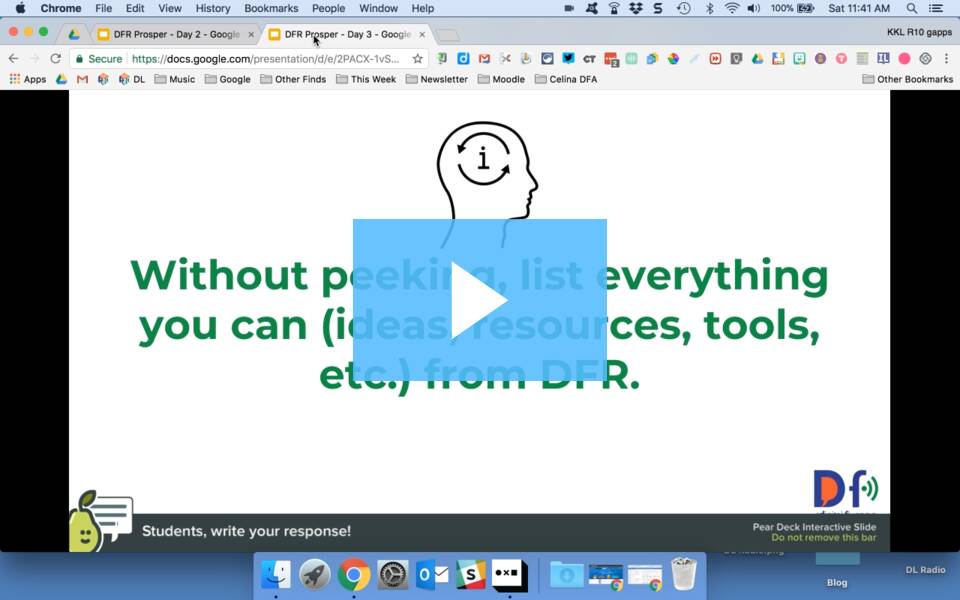
Here's how I changed my slide to pull information out of participants' heads to provide the exercise of retrieval.


...to this one!
Notice the "Without peeking" part of the instructions!

This very minor tweak allows me to demonstrate retrieval, and then start our conversation about how it could look in classrooms.

Dr. Agarwal founded retrievalpractice.org, and her site contains resources, research, and ideas...but at the very least, sign up for her newsletter. You can also glance at the newsletter archives to see all the learning goodness she shares. Her work is definitely relevant and classroom friendly. (You may have seen Dr. Agarwal's interview during the Ditch Summit, but unfortunately, that video is no longer available.)

This information and research is so important, so I'm trying to share her work with as many people as possible. I even brought up the idea at my dinner group (all teachers, so school talk is the norm) which led to a fun follow-up. One of my friends reached out to a former student who is now a cognitive scientist, and this was her viewpoint:


One last related resource: The Learning Scientists are contributors to the Retrieval Practice site, but they also have their own podcast and resources. They're working their way through the Six Strategies of Effective Learning, and they have two podcast episodes per strategy.

Have you read and applied the work from Made to Stick? What are you doing to improve learning in your work?

I'm always learning (and working to make it stick!)

Share:

Quick Wins

One of our vendors (Clarity BrightBytes) calls strategies "Quick Wins" and "Game Changers,"  and my teammates and I enjoy using those same phrases in our work. Colleagues request my go-to tools, so I started a list of my own quick wins. These ideas require only one-click, little set-up, or very low prep.

You can use four out of five of these quick wins for feedback or formative assessment. Three of these tools allow you to include video responses in your work.

Fist-to-Five 

I shared this strategy in an earlier post, and now I discovered that using this non-verbal assessment is as effective with adults. As shared in this video, educators can use fist-to-five for both social and academic check-ins, pre-assessments, quick exit polls, etc. My usual questions are:

  • How are you feeling today? (0 - 5 = worst day ever --> lovin' life!)
  • How do you feel about technology in general? (what's a smartphone --> I love all gadgets)
  • For Google training: How do you feel about Google apps?
  • What do you know about differentiated instruction?
When using fist-to-five with my students, 5 = I can teach someone else. After a few uses of this strategy, the kids start using the same language to assess themselves. Win!

As with all formative assessments, the key is to use the "data" to make instructional decisions. When my training session consists of participants who rate themselves as 4-5 with technology, I can move a little more quickly with the tech. The session attendees are more likely to click and experiment with the tools with very little prompting.

First-to-five is a quick win because it requires no prep, it can be used at any time, it's low risk, and it provides me with good information.

Google Docs Quick Create

This Chrome Extension allows you to create a new Google Doc, Sheet, Presentation, Drawing, or Form with a single click. I don't need to go to my Drive or type anything in the Omnibox...simply click and start a new document. One click is definitely a quick win!

WebCam Record

Alice Keeler shares a lot of information about the importance of immediate, specific feedback. She created this Chrome Extension for video feedback, and her tools are so efficient! Click the extension, click start, and the video immediately begins recording. You may record up to 90-seconds. Once you stop recording, the video saves in a folder in your Google Drive, and the video's shortened URL is automatically copied to your clipboard. Here's my sample video, and here are Alice's posts and suggestions about using her Webcam Record Chrome Extension. One-click + an efficient feedback tool = quick win! 

Loom

If you need longer videos, check out Loom. There are a lot of screencasting tools available, but this (new-to-me) Chrome Extension takes one click to start and stop, requires very little set-up, and includes these extra features:
  • You can add timestamps.
  • There is a text box underneath your video.
  • You can add comments that are time stamped.
  • You can set permissions for viewing the video (with a password or with a link).
  • You can choose where to position your webcam "circle," the size of the video-cam, or to have no video at all!
I used Loom for this quick screencast about another tool, but if you watch on Loom (click the icon in the upper right corner) you can see the video, comments, and text box.


Flipgrid

Last year's tool with the most buzz was Flipgrid. With their amount of social media interactions and responses to this product, the company built an enthusiastic community of educators. There are now more features and options for set-up, but Flipgrid is definitely a quick win because it is so easy for the user; click the green button and start recording! Flipgrid has a large number of possibilities for classroom and school use, such as introductions, reflections, and formative assessments. A colleague has used Flipgrid with the littles (PK-K students) and I ask even the most tech-timid to try Flipgrid...and all groups experience success with this tool.

Time is a precious resource for educators, so I'm always eager to share ways we can save even a few seconds. When a simple strategy or tool provides a lot of bang for your buck, it definitely needs to be shared! What are your favorite quick-wins?

Always learning...
Share:

Podcast Love

I'm kind of a podcast rookie (I missed the whole Serial excitement) but now that my work often includes quality time in my car, listening may be one of my favorite ways to learn. I recently noticed how often "I heard in a podcast..." creeps into my conversations!

I used to watch the news before work, but now I keep a podcast playing during my morning routines. I know listening and learning is a much more positive way to begin the day! At home, I sometimes use a small Bluetooth speaker that connects to my phone; otherwise, I prop up my phone in the kitchen window and listen while preparing meals or doing chores.

I subscribe to a lot of podcasts, and I keep others in my feed in case I run out of content. My rule is to stop listening if I'm not enjoying the episode. (I often feel like I have to finish that book, but it's easy for me to delete a podcast that I'm not enjoying!)

My favorite, non-educator specific podcasts:


  • For positivity and self-improvement, my top choice is Happier by Gretchen Rubin. Gretchen and her sister Liz Craft co-host this podcast, and I love their conversations, the podcast structure, their rapport, and even their word choices! (You can tell they're both writers!) The length of time is perfect for me (30 - 45 minutes) and I know I can finish an episode before I leave for work. It makes me happier to wake up on Wednesday mornings and anticipate a new episode! And understanding Gretchen's Four Tendencies framework is so useful for working with students and colleagues.
  • Gayle Allen's interviews on Curious Minds are thought-provoking and interesting. I want to know more, read the author's works, and keep learning! I realize I'm already biased because I'm such a fan of Dr. Allen's book, The New Pillars of Modern Teaching (see my post about it) but she is an incredible interviewer, and she is so knowledgeable about her subject's work; you can tell all parties enjoy the conversations.
  • Note to Self, "the tech show about being human," is relevant to my job, since I'm a Digital Learning Consultant, but the host Manoush Zomorodi provides us with information and ideas to help us control our technology, rather than the other way around. She creates one big listener challenge a year and follows up with research, solutions, and predictions. The results from her Bored and Brilliant project even became a TED talk and a book!
  • One of the reasons that I enjoy Pop Culture Happy Hour is that it is pure brain candy. The roundtable discussions are lively, fun, and interesting, and I hear a lot of fantastic book, TV, and movie recommendations...but I doubt I'll use this information during one of my PD sessions. 
For educator specific, my go-to's are these very popular podcasts: Cult of Pedagogy, Google Teacher Tribe, and 10-Minute Teacher with Vicki Davis. I also can't leave out my team's podcast, Digital Learning Radio! (Check out this episode where we interview Gayle Allen.)

For those who don't (YET) listen to podcasts, this video with Ira Glass and his friend Mary is priceless! They share and show how to listen to a podcast:

Of course, This American Life is the premier podcast, and I bet many podcast hosts secretly aspire to be like Ira. :)

For listening, I use the Overcast app, and I like how easy it is to share an episode at a particular minute.

I know audio isn't for everyone, but I find that podcasts meet my learning preferences and they're easy to share. For my professional learning sessions, I try to play at least a minute or two of audio, and I now add podcasts (or particular episodes) to my resource pages.

I'm always on the lookout for recommendations, so what are your favorite podcasts? Do you use podcasts for learning?
Share:

Obvious to You


One #MTBoS trend I saw this summer (and something I wanted to blog about for months) was the idea to simply share. Share your work, your questions, your ideas, your classroom, your lessons. Without the feeling of doubt that "This idea isn't good enough," or "Everyone already knows this." Without the feelings of vulnerability. A group of educators even started using the hashtag #pushsend, which was perhaps like the famous ad slogan, "Just do it." 😉  I love the approach, I need to remember this suggestion, and this post is my action plan!

One of my favorite things to share in sessions is Derek Sivers' video, "Obvious to you. Amazing to others," and I think this video is a perfect reminder to get over this fear.  I think it's especially difficult (for me, at least) when colleagues learn the same things as you; they know the same tips, tricks, and tools, they attend the same conferences and read the same books. It's almost a competition to see who can find and share something new...but it shouldn't be!

While in the classroom, it was often a feeling of competition for who received a "Teacher of the Week," recognition from a team, or whose classroom was the "best," based on the talk in the school. But again, it shouldn't be!

In this recent post by David Geurin, he reminds us that "we want collective greatness." All students are winners when there are 100 wonderful teachers on campus! All schools and districts win when all of us are providing the professional development services that help move the learning forward.

We all have something great to contribute. It doesn't matter if someone else shared it first. Go ahead, just do it. Learn, share, and grow!
Share:

New Pillars

May I make a book recommendation? My favorite edu-read of the past year is The New Pillars of Modern Teaching by Gayle Allen, and this book has truly changed the way I think about teaching and learning.

In the book, Dr. Allen shares the reasons why educators must shift from the old pillars (instruction, curriculum, assessment) to the new pillars of design, curation, and feedback. The three primary chapters share how we transition from the old to the new pillar, give an example of that pillar in the "real world," provide what it looks like for students and what it looks like for educators. The book is tiny (44 pages!) but packs such a powerful punch that I keep it with me at all times and constantly refer to it. My colleagues and I embed the new pillars in almost every professional learning session we provide, and we even created sessions on each of the three individual pillars!

#booksnap from the Introduction
At first glance, the book does not look like a technology book, but oh yes, it's all about WHY we must embrace technology for our teaching and learning. The book is all about empowering learners, whether you're a student or teacher, and it helps us understand the impact of living in a time of information abundance. (This idea supports a favorite quote from Alice Keeler, "Teach like Google and YouTube exist!") Teachers no longer need to be "the funnel and the filter" of the learning, but Dr. Allen says the change doesn't diminish teachers' roles, it enhances it! In each of the chapters, she reminds educators that we must experience this type of learning ourselves (with the technology) if we are to help our students own their own learning. The book includes tech tool recommendations, but of course, it's not all about the technology.

The other thing I love about the book is that I get the feeling that Dr. Allen truly understands educators' lives: our time constraints, our school/district mandates, and trying to keep up with it all. She knows we're trying to move mountains, so the book is filled with reminders such as, "It's not important which technology we choose--just that it helps us achieve our goals." And "the key is to start small..." She provides choices, helps us understand our preferences, and presents compelling reasons for us to transition to the new pillars. And by the way, chapter 5 is Iteration and Failing Fast to Learn, so she includes ideas related to #growthmindset, too! "The key is to get past perfection paralysis."

Commercial: by the way, my colleagues and I are hosting our second free, online book study over The New Pillars, and you're welcome to join us on this journey! Beginning October 17, 2017, we'll explore one chapter per week, and share ideas with a podcast, learning tasks, and Twitter discussions.

Second commercial: Dr. Allen's podcast, Curious Minds, is one of my favorites. Her interviews are outstanding, and her depth of knowledge and questions to the authors are so interesting that I want to read every one of the featured books! She is also extremely active on Twitter and shares fascinating posts, research, and ideas.

Have I piqued your interest? Have you already read The New Pillars of Modern Teaching? Do you have another book that has completely transformed your ideas about teaching and learning in the digital age?
Share:

Making Thinking and Learning Visible (Digital Version!)

I'm still exploring thinking routines, documenting learning, and doing all with a technology twist, so I thought I would focus on a few closure activities. I wanted to work on these ending routines because
  1. I always needed an extra push for a solid closure in my own classroom, and
  2. I am encountering the same problem in my professional learning sessions.  :(
Whether teaching students or adults, I often feel like I'm rushed at the end of a class, and I know the students (adults) are ready to leave...so I often drop the closing activity (or rush through it with little time for processing.) I think a final summary, reflection, or share out is extremely important, so I hope by creating some of these electronic versions of the thinking routines, I won't have an excuse to skip the finale!

Headline Routine

I tried this thinking routine in a recent session, and I had participants collaborate to create a headline for the day's experience. The description from Project Zero states, "If you were to write a headline for this topic or issue right now that captured the most important aspect that should be remembered, what would that headline be?"

I added a tech twist by asking the participants to use the ClassTools Breaking News Generator to quickly post their headline, and because of time (arrghh!) we didn't quite finish, but I got a few responses via Twitter.
Here's another quick headline example, and I just right-clicked to save the image. By the way, the ClassTools site has a lot of quick, easy resources, such as random name generators, "fake-book," and graphic organizers, and you do not need a login or account.


An easier way to collect a headline would be with a Google Form. Use data validation to limit the number of characters in the response.


Other options to collect headlines and share with technology could be with open-ended questions on Mentimeter or Today's Meet. (Both have a limit of 140 characters so it could be a version of "Tweet it to me.")

In Making Thinking Visible, the authors point out the importance of being careful about not simply coming up with a catchy phrase or slogan for the Headline routine, and that's where the time factor is important. Students must have enough time to summarize the core points of the day's learning. The technology should not get in the way of the thinking!! But I like the ClassTools option because there is a little extra space for explaining the "words behind the headlines." (pg. 115)

Compass Points

One other routine I often use is a Compass Closing. I think the questions are great reflection questions, but by the end of the day, I'm usually happy if I can get 1 response for each prompt.


Ideas for a technology twist:

  • If you want students to have personal, individual responses, a Google Doc or Form allows you to collect all of the responses, although the benefit of a Google Form is that all responses are on one spreadsheet.
  • I keep finding great uses for the Padlet shelf option, and this thinking routine is another perfect fit. If you want the students to see other responses, which is often very beneficial, posting and allowing comments on Padlet might be the way to go.
With the technology twist, everyone participates, and even the quietest student has a voice! In addition, I now have another formative assessment and can make instructional decisions based on students' responses.

I finally invested in Making Thinking Visible (Ron Ritchhart, Mark Church, Karin Morrison) and I cannot wait to really dig into the research and routines. The mission of the book, "not only learning to think but thinking to learn," is exactly what's on my mind lately, and I also love how the authors really debrief and troubleshoot the core of these routines.

Any other favorite thinking routines? Do you think the technology helps or hinders the process?

Share:

Learning About Learning


During the past few months, I have been reflecting a lot about documenting learning and how technology can help with that process. For several years, I have been interested in using formative assessments to make instructional decisions, and I know there are connections between the two, so now, I'm reflecting on this year's experiences and trying to put all of these learning-pieces together.

My Knowledge Base

John Hattie's work and his three feedback questions helped me solidify understandings about effective feedback and how/where to infuse feedback into the learning process. In The Google Infused Classroom, Holly Clark and Tanya Avrith share related ideas when they discuss assessment for/as/of learning. In their book, they also provide ways to make thinking visible and discuss how technology can amplify the learning process, and they reference the Project Zero Thinking Routines. The work from Silvia Tolisano and these posts have also inspired a lot of reflections on documenting for/as/of learning. (Silvia also creates fabulous graphics and sketch notes, and I'm looking forward to her upcoming book.) All of these thoughts about learning, feedback, and thinking routines are swirling in my head!

Blending Ideas

Holly and Tanya include a lot of ways to use technology to make thinking visible, so I'm going to try to do the same. I work with adult learners, but I'll begin with some of the strategies I used in my classroom. By the way, one big eye-opener in their book was the importance of learning from others to shift thinking. It's OK to have "public" posts for all to see, and that is definitely a shift in my thinking. Yes, some kids may copy answers, but others may think, "Oh, that's what she meant!" and formulate their own responses.

See-Think-Wonder

One of the first thinking strategies I tried was "What do you notice, and what do you wonder?" We even tried this idea with trigonometry vocabulary words on day 1 to illustrate that a lot of pre-calculus would be based on concepts you already know! (Trying to activate prior knowledge.)

Here's a description of the See-Think-Wonder routine, and here's an example of the routine being used in a health class. I always used the "Notice and Wonder" questions, but I like the structure of See-Think-Wonder, so I'm going to add the third question when I use this routine now.

When I tried this activity in class, I only had students share responses with each other and then "popcorn" out a few answers. In the video linked above, the teacher created a graphic organizer for his students, used think-pair-share for students to compare their responses, and then had a final debrief with a show of hands.

Options with technology...

Instead of simply observing an image, listing a few see/think/wonder statements, and sharing with a neighbor, how could technology be used to amplify this process?
  • You could use comments in Google Docs, and I have used this notice-wonder activity in my sessions. Students could choose their preferred image, and they could reply to each other's comments. 
  • You could use a Padlet board to collect comments from each student, and with the new "shelf" option in Padlet, you can create the see-think-wonder prompts as columns.
  • If you didn't want the kids to see each others' responses, you could use Google Drawings to create a graphic organizer and share as a template in Google Classroom (or "force" a copy for each individual.)
  • Another option if you wanted individual responses: you could use a Google Form to collect all responses.

I can see benefits to both the individual and shared responses...it all depends on the activity. BUT by using technology, you have amplified the process because you are able to hear from every student ("Even the quietest student has a voice!"), responses are documented, and if students can see all of the work, they can learn from and provide feedback to each other.

And with adult learners?

My friend Katie recently used Mentimeter for a faculty poll, and the responses are below.

I think the See-Think-Wonder strategy would be an excellent debrief after this type of activity, and I think it would help educators understand how technology could amplify the learning/feedback process. A few things I hope the participants would see, think, and wonder:

  • There were 184 entries, so the entire faculty had a chance to respond.
  • How long would it take for you to go around the tables and ask 184 people to answer the question?
  • The most common responses/trends are evident. (The largest words received more responses.)
  • How long would it take to see trends if responses were on post-its or slips of paper?
  • If you couldn't immediately think of a response, you could see what others said to give you ideas.
  • How could this tool/strategy be used with your class or team? What are the benefits? What are the drawbacks?
After working on this post today, the ideas are still swirling in my head, but I really like the idea of taking visible thinking routines and looking at tech-options. I firmly believe that you don't use technology for the sake of the bells-and-whistles, but I feel, at least in this case, the use of technology really could amplify the learning/feedback process.

What are your favorite thinking routines? I would love to see if technology could facilitate the process!
Share:

Keep Up with Reading!

I have always loved reading, and I constantly add new books to my shelves (and Kindle app); however, I am still working on ways to take notes while reading to keep up with favorite passages, quotes, and ideas.

In the past year, I have...

  • annotated passage within the book,
  • written paper notes/post-its to stick on the book,
  • created #booksnaps
  • tried #sketchnoting the books on the iPad, and
  • tried #sketchnoting the book using a Rocket book

For my next attempt at keeping up with my reading, I'm trying Google Keep for my book notes, and so far, I love my new system! Keep is a digital post-it note app within G Suite. Because it's part of the Google family, it includes a powerful search feature and the ability to add collaborators to the notes. Furthermore, notes sync between devices.

As I start a new book, I take a picture of the cover to add to my Keep header. Next, I add a few labels (including "books") based on the subject. 

What's on my shelf now...

As I read, I  take notes on any available device, so that's one huge plus. I also pin current books to the top of my Google Keep, and that's a visible reminder to keep reading. Because my "pack" of notes continues to grow, I am thankful for the search feature, and I have become much better about fine-tuning the names of my labels. I have not (YET) created a color-coding system for my books, but that could be the next possibility. I can add reminders and alerts, and from a mobile device, I can even start a new note by recording a message.

The other part of this workflow that is a bonus for me is that I can now easily access my Keep notes within a Google Doc. Most of these books are for work, of course, so as I'm planning a session, I can open a relevant book in Keep, and add those quotes and notations directly into my Google Doc! I am getting so much better at adding page numbers to my notes, so it's incredibly easy to copy, paste, and create the book citations as I plan for upcoming PD sessions.


By the way, The New Pillars of Modern Teaching has been my favorite edu-read from the past year, and I think I documented my reading in every other way mentioned above! I may need to go back and take notes in Google Keep!


Do you have a tried-and-true way of taking notes about books?

I'm so happy when I'm reading, and I'm always up for learning!
Share:

Joy Bots!

Don't you love it when you're inspired by a single sentence? I was scrolling through Twitter during a session lunch break, and this Tweet caught my eye:

Lilly works in a nearby district, and she has an awesome after school program called "Gadget Girls," where she works to encourage elementary girls with STEAM related projects. Her Tweet and the search for @botjoy inspired a fun summer creativity project, and I can't wait to share it with others!

The "bots" are actually hand-painted dominoes, and the idea is to pass along the bot to someone who needs a little physical reminder of joy, love, confidence, etc. The artist, Gary Hirsch, also leaves his Bots in the world for others to find, and he has instructions for how to "program" and activate your Bot on botjoy.com.

There are Joy Bots, which are programmed to bring you instant joy and outrageous compliments; Love Bots love you unconditionally, and there are Brave Bots, Idea Bots, Collaboration Bots...you name it! The project ideas on the website are perfect for school groups, community service projects, and others who want to create and share. In this video, Gary explains his project, and the only supplies you need are white dominos, oil-based markers, and a quick polyurethane coat for protection.


I am not an artist, but I keep reading about the importance of creating and making, so I love this idea as a #growthmindset project. I knew someone at work who would jump on this project too (and she is an artist!) so the first #R10bots have been deployed, and more will be activated soon. :)
One person at this meetup taught 5th grade, and she was so excited about the Bots! She plans to have her students create Bots and then write their stories. Others at our #CoffeeEDU loved the idea so much that we're meeting next week to create Bots together.

I gave away a few Bots during a recent session (for the winning team during a quick contest) and the teachers were thrilled! For the rest of the summer, I will be in and out of various classrooms, so I plan to leave a Bot and card as a thank you note for the use of a room.
Gary Hirsch's 2013 TED talk explains how the Bots were born, and his story is all about collaboration, so it's a wonderful message for everyone.


Have you heard about Joy Bots? Is this a project that your students or teachers would enjoy?

I'm inspired to create, and I'm always learning.
Share:

Inspired by ISTE

This week marks my 2-year anniversary at my "new" job, and I continue to learn, grow, and connect, thanks in part to opportunities provided by my work. Attending last week's ISTE conference was one awesome job perk, and what an incredible learning experience! I attended ISTE last year too, but this year, I tried to be better prepared.

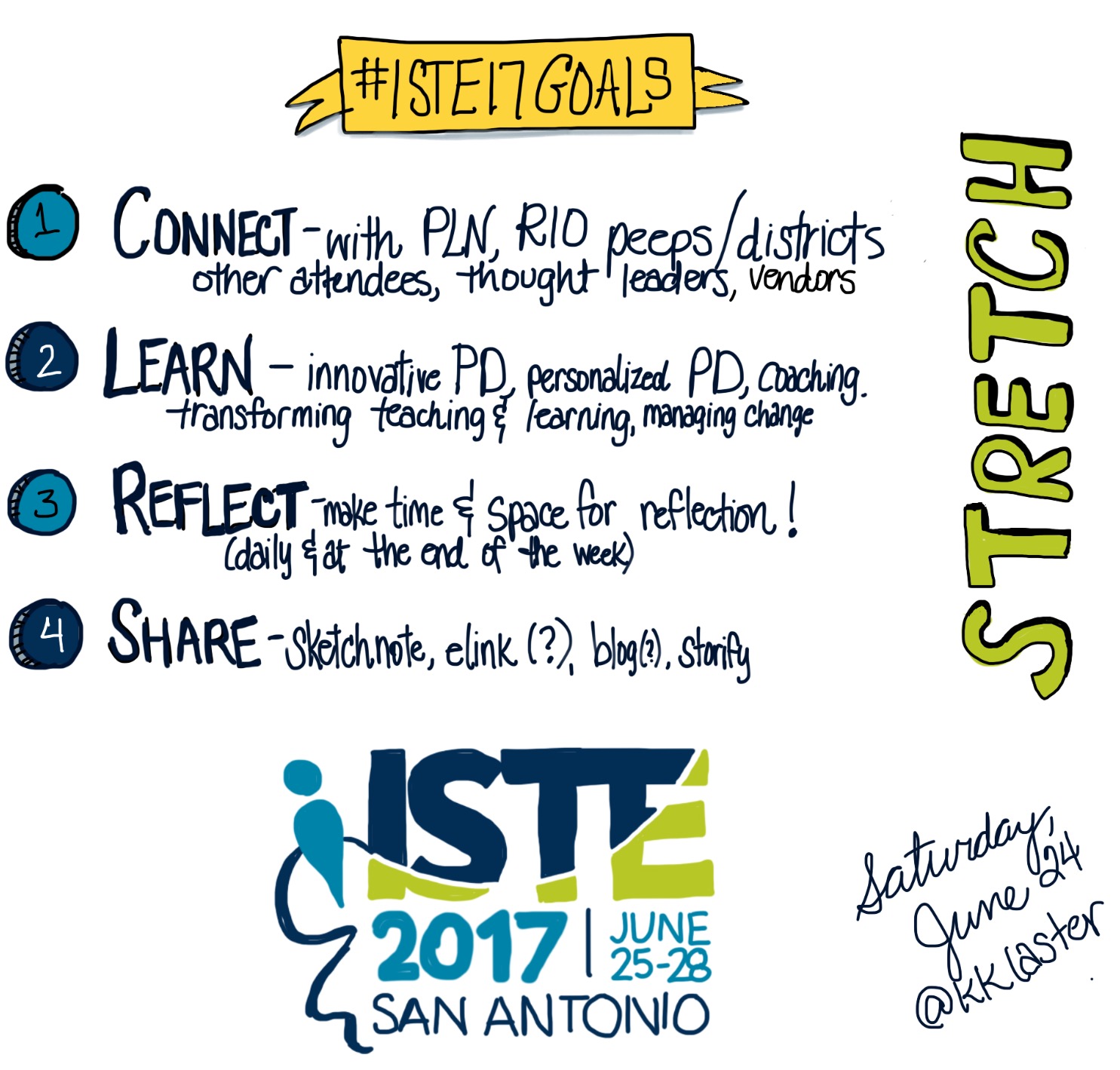
Inspired by advice on Twitter and blogs, I created a few ISTE goals and even sketchnoted my priorities:

I feel I really succeeded at goal #1, and I've decided connections and collaboration will be a priority as I begin year 3 on my job. I know (especially) at tech-focused events, participants are often engrossed in their devices, so at this conference, I was determined to be intentional about striking up conversations, really listening to people, and looking for ways to connect with others. (Such a stretch for me, but it was only for 3 days!) Since ISTE was held in San Antonio, which was a tiny flight or a manageable drive from DFW, I kept running into people from our region, which was so fun! And when I started asking what people were learning and really listening to what they were looking for, I started making connections and started thinking about building bridges, like these...


The past several months, I worked to connect departments and to breach a few silos in the office. It's now time for me to move beyond the workplace and be on the lookout for building those bridges across the region. "You're rural district X and you're just getting into Google? Let me connect you with some leaders in a similar district Y, and they just finished their first year of implementation..." "You're starting a district-wide digital citizenship plan? Let me introduce you to Z who is doing the same thing!" With two years of meeting people and working with more districts and teams, making connections should be a priority!

Bottom line, it always goes back to building relationships, doesn't it?!

Always learning.
Share:

Happy to be Blogging (Again!)

After a lengthy absence from the blogging world, I'm making attempt number ?? to return. Inspired this summer by conference keynotes, other bloggers, and my own desire to be a more reflective educator, I thought I would try, try again.

I started the alphabet journey in 2015, and it's a happy coincidence that I'm at letter H because this week I have the privilege of attending #ISTE17, and I know I can create a post for letter I.

During one of my sessions in Dallas ISD this week, a teacher shared this nugget (thanks, Ed!) and I thought it was an awesome school policy. Would this procedure work for your campus?


As we were reflecting on the day's learning, a few participants expressed some hesitation to try new strategies/tools, mainly because of the stress of an evaluation or an unexpected walk-through. Ed shared his agreement with his principal to have a sign on his door that said, "Teacher Learning in Progress," or "Technical Learning in Progress," which indicated he was trying something new. The administrator was welcome to observe and learn, but that class period would not be used as an evaluation. I love this idea, and what a wonderful way to nurture a culture of #growthmindset. (Actually, I'm sad that some of our schools do not establish a culture of risk-taking and failing forward...but that's another conversation.)

I also simply love the phrase Teacher Learning in Progress because that's what our journey is all about, right? When I started this blog several years ago, my focus was math, and I taught calculus at the time, so the "No Limits on Learning" title was fun (for math nerds) and appropriate, but I love how the blog title is still a perfect fit today.

My learning is definitely in progress!
Share:

Going to a Conference!


Letter G in my #ReflectiveTeacher journey...

Last week, I found this blog post from Imagine Easy Solutions that encouraged educators to blog during their conference sessions...but I forgot about it until now, so I will start tomorrow. I didn't arrive in Austin until almost noon today, and I only attended a couple sessions, so perhaps an end-of-day reflection is OK for today!


Take-Aways:

  • #TCEA16 will probably trend all week. I was almost overwhelmed yesterday (before I even arrived at the conference) trying to keep up with the flood of ideas, posts, and resources. Following giant conference hashtags is now at the top of my to-do list. I can't believe how much I'm learning through Twitter.
  • TCEA organizers have their conference down to a fine science, and I appreciate all of the time and work it must take to pull off an event of this magnitude! Check-in was a breeze, the conference app is constantly updated, and there are signs, marquees, and volunteers everywhere, so my questions are already answered!
  • Presenters: thank you for providing access to your handouts! If we cannot get into your session, your notes, sites, or presentations are giant birthday gifts, waiting to be unwrapped and explored. (I just need more time to look at the 500+ links!)
  • It is hard to attend a ginormous conference by yourself. This year is so much better, though, because I have made so many connections during my time at my new job, so I keep running into people I know (or who know me!) Whether it's in the hallway or in the fast-moving Twitter stream, it's awesome to be a bit more connected this year. 
  • ...but attending a ginormous conference can also be overwhelming, so quiet time at the end of the day is a must for me!
  • I didn't put in a proposal to present this year, and I kind of miss presenting, but I must admit, it is more relaxing to "just" be a learner and participant.
  • At a technology conference, so many people are glued to their devices, so I always appreciate when the presenter prompts us to "turn to your neighbor and share..." In my opinion, one of the best parts of a conference is making connections, and that's a bit difficult when you're constantly looking at a screen.
  • I am such a math-person (linear, concrete-sequential, etc.) and I have planned PD sessions for many years, so I prefer presentations that are super-organized, purposeful, and thoughtful. Your slides don't have to be designed by a graphic artist, but please follow some kind of outline, provide an essential question, or explain the session goals.
  • I caught a Google Hangout (on Air) reflection session from one of our district partners, and I thought that was an awesome way to end the day! The tech leader had several of his teachers tell one or two of their favorite take-aways from the day, and it looks like he plans to follow this model all week. How awesome is that, to model the tool, get the teachers reflecting, and document their learning!?
In other news, I helped moderate the very first Twitter chat for our service center, so that was an accomplishment for the evening. I worked with a science consultant, and we have the next several months of topics planned. (#R10chat) It was a small group, but we know we had lurkers and a few who were new to Twitter, so to get more people excited about connecting is exciting!

Looking forward to another day at #TCEA16.
Always learning.
Share: